
URL-Based Image Transformations
If you’d like to resize, convert, or control encode quality as images are optimized, PicPerf’s transformation feature lets you do that from the URL. To do so, insert /t/YOUR-PARAMS immediately after https://picperf.io and before your image URL. The parameters themselves must be a comma-separated list of values, where the name and value of the parameter is separated by _. For example:
You can also force a specific output format or set encode quality:
https://picperf.io/t/width_400,height_400,fit_cover,format_jpeg/https://yoursite.com/pic.jpeghttps://picperf.io/t/width_800,quality_60,format_webp/https://yoursite.com/pic.jpeg
Supported Transformations
Section titled “Supported Transformations”Currently, the following transformations are supported (with more on the way!).
| Parameter | Value | Required? |
|---|---|---|
| width | number | no, will be auto-calculated if only “height” is provided |
| height | number | no, will be auto-calculated if only “width” is provided |
| fit | ”cover”, “contain”, or “fill” | no, “cover” is the default value |
| format | ”jpeg”, “jpg”, “png”, “avif”, or “webp” | no, the original format is used by default |
| quality | number from 1–100 | no, encoder defaults are used when omitted |
Fitting Images
Section titled “Fitting Images”Here’s a breakdown of how you’re able to fit your images to specified dimensions.
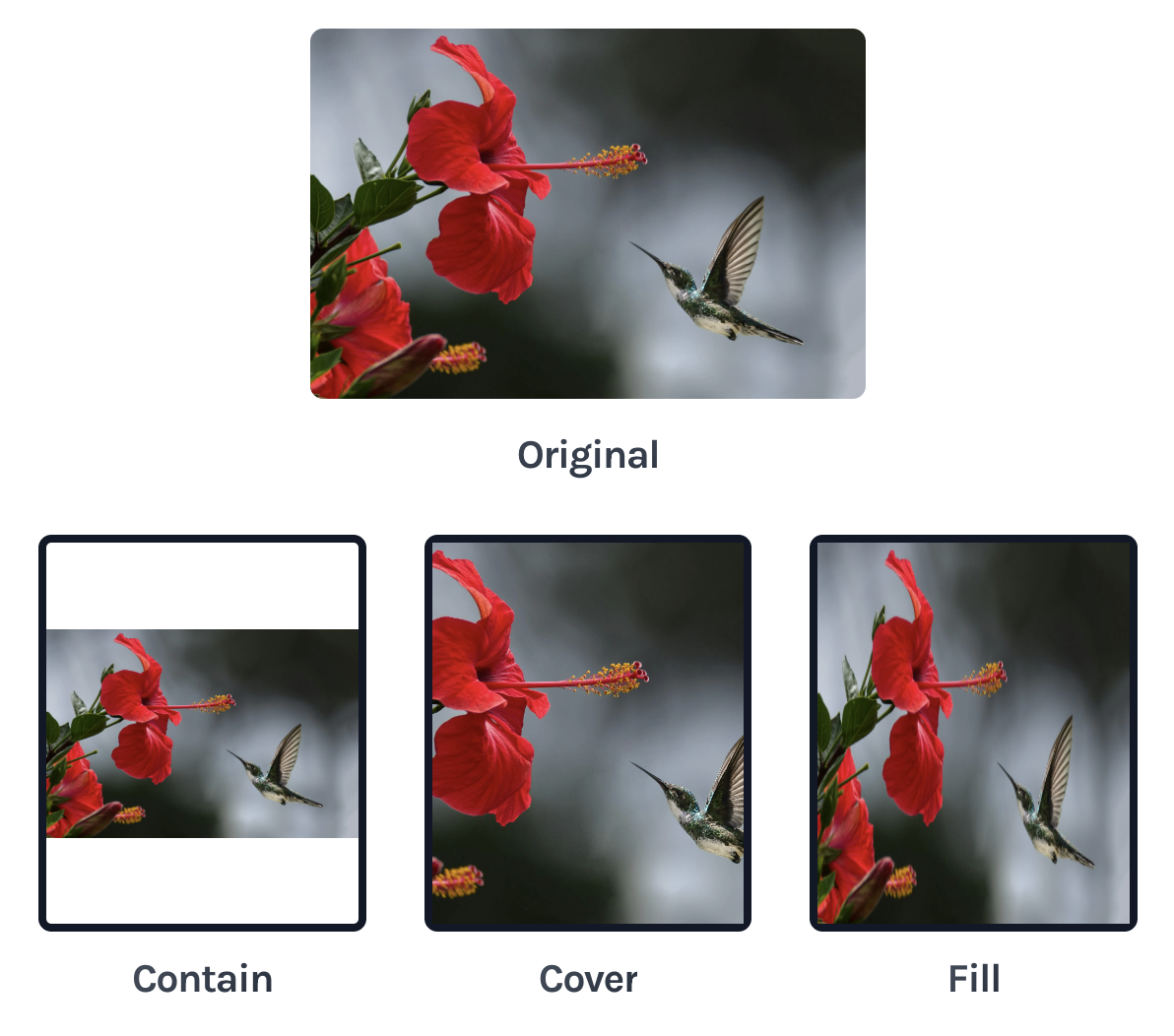
This the default value. During cropping, the image’s aspect ratio will be preserved, but may be clipped in order to fit the specified dimensions.
contain
Section titled “contain”None of the image will be clipped. It’ll be made to fully fit within the specified dimensions, which may mean that the image does not meet one dimension or the other.
The image will be forced to fit the specified dimensions, regardless of what it does to the aspect ratio.
Forcing Output Format
Section titled “Forcing Output Format”Use the format parameter when you need the image returned in a specific format, regardless of the original file type. This is useful when you need consistent output across mixed sources — for example, converting PNGs and JPEGs alike to WebP for a modern browser audience.
Supported values:
jpegorjpgpngavifwebp
format can be used on its own or combined with resize parameters:
https://picperf.io/t/width_800,format_avif/https://yoursite.com/pic.jpeg
When format is specified, PicPerf returns the image in that format instead of automatically choosing the smallest optimized format.
Controlling Encode Quality
Section titled “Controlling Encode Quality”Use the quality parameter to set a tool-agnostic encode quality intent for lossy formats (JPEG, WebP, AVIF, and JPEG XL when enabled). You do not need to know each encoder’s internal scale — PicPerf maps your single value to the right setting per format.
| Detail | Behavior |
|---|---|
| Range | Integer 1–100 |
| When omitted | Each format keeps PicPerf’s / the encoder’s normal default |
| Scale meaning | JPEG-like: 80 is “standard web quality” |
| Mapping | PicPerf scales each format proportionally from its own default (so AVIF is not forced to the same raw number as WebP) |
Examples:
https://picperf.io/t/quality_80/https://yoursite.com/pic.jpeghttps://picperf.io/t/width_800,quality_60/https://yoursite.com/pic.jpeg
https://picperf.io/t/width_800,quality_60,format_webp/https://yoursite.com/pic.jpeg
Notes:
- Lower values generally produce smaller files; higher values favor visual fidelity.
qualitydoes not apply to formats that are not quality-based in PicPerf’s pipeline (for example PNG and SVG structural optimization).- Different
qualityvalues create distinct cached variants of the same source URL (they count as unique optimized images for pricing, same as other transforms).
Pricing
Section titled “Pricing”Image transformations are included in your plan, but note that every different transformation applied to the same image URL will count as a unique optimized image for your plan.
For example, each of these URLs will be treated as 500 distinct images optimized, despite the same source URL being used:
https://picperf.io/t/width_1/https://yoursite.com/pic.jpeghttps://picperf.io/t/width_2/https://yoursite.com/pic.jpeg
https://picperf.io/t/width_3/https://yoursite.com/pic.jpeg
.........
https://picperf.io/t/width_499/https://yoursite.com/pic.jpeg https://picperf.io/t/width_500/https://yoursite.com/pic.jpeg
Keep in mind that there is no limit to the number of times a transformed image can be served. After transformation has occured, it could be served from one to one billion times with no impact on cost.